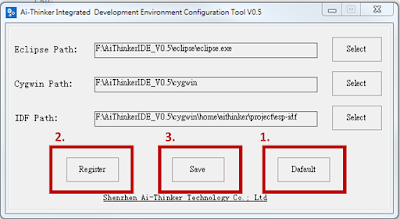
官方文件的IDE使用上複雜,跟ESP8266一樣使用安信可的AithinkerIDE 載點: AIthinkerIDE 這套IDE使用上簡單明瞭,安裝方法簡單就不多寫了 ------------------------------------------- 1.安裝Aithinker_IDE 2.打開configTool.exe 3.Cygwin/home/aithinker/project -將esp-idf資料夾整個刪掉 -到 esp sdk網站 下載ESP32-IDF -載完後將esp-idf-v3.1.3(目前下載版號為3.1.3)拉到Cygwin/home/aithinker/project 4.打開cygwin/Cygwin.bat - cd project - cd esp-idf-v3.1.3 - git clone https://github.com/espressif/esp-idf-template app 5.打開AiThinker_IDE.exe 6.刪除原本的esp-idf專案 7.導入專案:File->Import->點選"Existing Code as Makefile Project" 8.導入cygwin/home/aithinker/project/esp-idf-v3.1.3 -點選Cygwin GCC -Finish 9.設定 -esp-idf-v3.1.3右鍵->Properties -c/c++ Build -Build directory欄後面加上app -Apply -ok 10設定Target -右鍵->Make Targets->Create -Target name: MeanuConfig -Build command : mintyy.exe -e make menuconfig -第二欄Make Target的Same as the target name勾勾取消,Make target清空 ...